How to Learn Data Analysis From Scratch: A Practical Roadmap
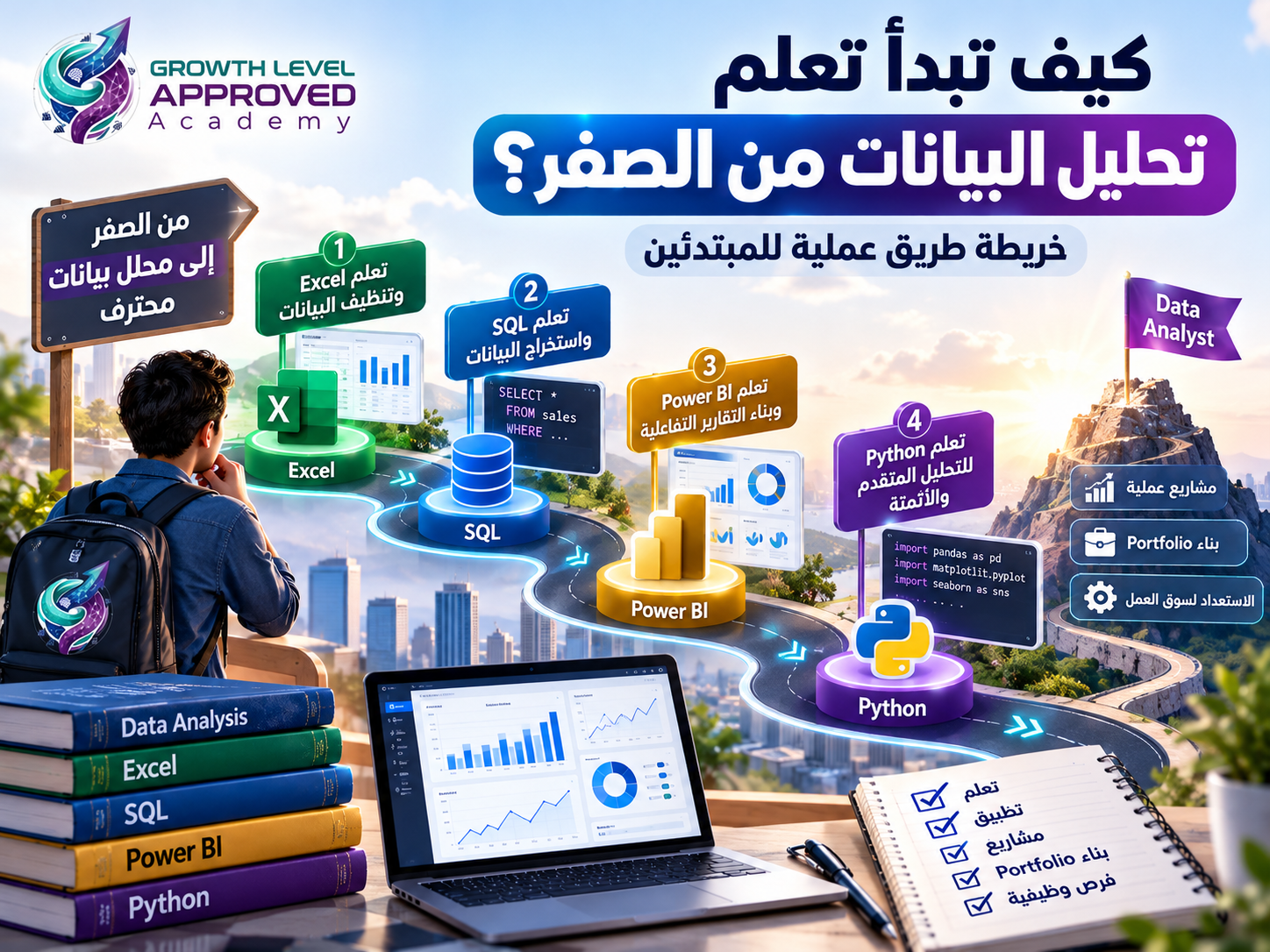
How to Learn Data Analysis From Scratch: A Practical Roadmap
If you want to learn data analysis but do not know where to begin, you're not alone.
One tutorial recommends starting with Excel, another suggests Python, while others emphasize SQL or Power BI. With so many learning resources available, it is easy to spend months watching lessons without developing practical skills.
A more effective approach is to understand what data analysts do, learn the essential tools in a logical sequence, and practice solving realistic problems.
This guide introduces a six-stage roadmap for learning data analysis from scratch, including beginner-friendly exercises, portfolio projects, and a sample 24-week study plan.
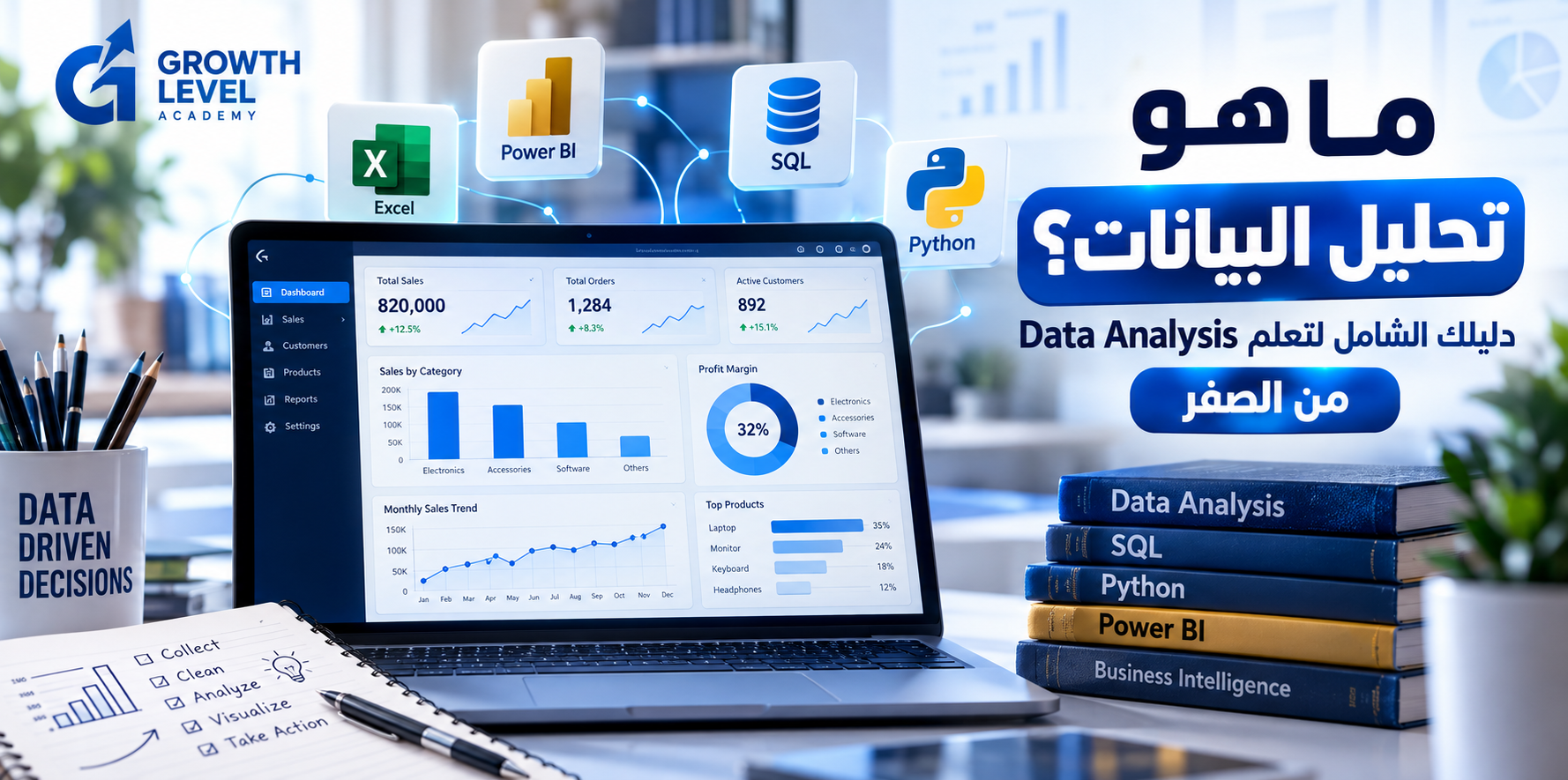
What Is Data Analysis?
Data analysis is the process of collecting, cleaning, organizing, exploring, and interpreting data to answer questions and support informed decisions.
A data analyst might investigate why sales decreased, which products generate the highest gross profit, how marketing campaigns perform, or which customer segments purchase most frequently.
The analyst's role is not limited to creating charts. It involves understanding a problem, checking the quality of available information, choosing appropriate methods, and explaining the findings.
For a broader introduction, see our article: What Is Data Analysis? A Complete Beginner's Guide.
Can Beginners Learn Data Analysis Without Programming Experience?
Yes. You can begin learning data analysis without a programming background or a computer science degree.
Basic spreadsheet skills, mathematical reasoning, curiosity, and consistent practice provide a useful starting point.
However, beginning a learning journey and qualifying for a professional position are different goals. Job readiness depends on practical competence, portfolio quality, and the requirements of specific employers.
The Six-Stage Data Analysis Learning Roadmap
Stage | Focus | Learning Goal |
|---|---|---|
1 | Data and statistics | Understand and interpret information |
2 | Excel | Clean, organize, and analyze spreadsheets |
3 | SQL | Query relational databases |
4 | Power BI | Model data and build interactive reports |
5 | Python | Automate and extend analytical workflows |
6 | Portfolio projects | Demonstrate practical problem-solving |
This sequence works well for many aspiring business data analysts, but it can be adapted to different career goals.
Stage 1: Learn Data Fundamentals and Statistics
Before choosing a software tool, learn to recognize the information you are working with.
Understand Data Types
Common categories include:
Numerical data, such as revenue and order quantity.
Categorical data, such as region or product category.
Date and time data, such as order dates and transaction timestamps.
Learn Essential Statistical Concepts
Focus on:
Mean, median, and mode.
Percentages and growth rates.
Variance and standard deviation.
Distributions and outliers.
Correlation versus causation.
Practical Example
Imagine five daily revenue values:
1,000; 1,200; 1,100; 1,300; and 5,400 EGP.
The mean is 2,000 EGP, while the median is 1,200 EGP.
The unusually high fifth value substantially affects the mean, demonstrating why different summary statistics tell different stories.
Practice assignment: Analyze 30 days of sales data and calculate total sales, average sales, median sales, minimum, maximum, and weekly changes.
Stage 2: Learn Microsoft Excel
Excel is a practical starting point because it provides an accessible environment for organizing, cleaning, and analyzing data.
Essential Excel Skills
Start with tables, sorting, filtering, cell references, and data validation.
Then practice:
SUM and AVERAGE.
IF and IFS.
SUMIFS and COUNTIFS.
XLOOKUP.
Date and text functions.
PivotTables and PivotCharts.
Conditional Formatting.
Power Query.
Power Query is particularly valuable for repeatable data preparation workflows.
Beginner Excel Project
Create a retail sales dataset containing Order ID, Order Date, Product, Category, Quantity, Unit Price, and Unit Cost.
Your tasks are to identify data quality issues, calculate revenue and gross profit, summarize monthly performance, and create a PivotTable report.
You are ready to progress when you can clean a spreadsheet, calculate meaningful metrics, and explain the results.
Stage 3: Learn SQL
SQL, or Structured Query Language, is commonly used to retrieve and analyze information stored in relational databases.
Unlike a spreadsheet containing a single table, a business database might store customers, orders, products, and payments in separate related tables.
SQL Concepts to Learn
SELECT and WHERE.
ORDER BY.
GROUP BY and HAVING.
INNER JOIN and LEFT JOIN.
CASE expressions.
Subqueries.
Common Table Expressions (CTEs).
Window functions.
Example SQL Query
Suppose an orders table contains one row per order item, with the columns product_id, quantity, and unit_price.
SELECT
    product_id,
    SUM(quantity * unit_price) AS total_revenue
FROM orders
GROUP BY product_id
ORDER BY total_revenue DESC;
This query calculates revenue by product, assuming the stored prices and quantities are valid and no additional adjustments are required.
Practice assignment: Query a sample database to identify the highest-spending customers, monthly revenue trends, and order counts by city.
Stage 4: Learn Microsoft Power BI
Power BI helps analysts connect data sources, build data models, define business metrics, and create interactive reports.
A useful learning sequence includes five areas.
Power Query
Import, transform, and clean information.
Data Modeling
Understand relationships, fact tables, dimension tables, and star schemas.
DAX
Learn how to write measures that calculate metrics based on report filter context.
For example, given a Sales table with a Revenue column:
Total Revenue = SUM(Sales[Revenue])Data Visualization
Practice selecting suitable charts for comparisons, trends, distributions, and KPIs.
Report Design
Build accessible dashboards with readable labels, consistent calculations, and useful filters.
Practice assignment: Create a sales dashboard showing revenue, gross profit, margin, order counts, monthly trends, and regional performance.
The dashboard should answer business questions, not simply display attractive graphics.
Stage 5: Learn Python for Data Analysis
Python extends your ability to automate repetitive tasks, process data programmatically, and perform more advanced analysis.
Important Python Libraries
pandas: Data preparation and analysis.
NumPy: Numerical operations.
Matplotlib: Data visualization.
Seaborn: Statistical visualization.
scikit-learn: Machine learning algorithms and related utilities.
Beginner Python Example
Assume your sales.csv file contains Product, Quantity, and UnitPrice.
import pandas as pd

df = pd.read_csv("sales.csv")

df["Revenue"] = df["Quantity"] * df["UnitPrice"]

result = (
    df.groupby("Product")["Revenue"]
      .sum()
      .sort_values(ascending=False)
)

print(result)
This code reads a dataset, calculates revenue for each record, and summarizes revenue by product.
Real business datasets require additional validation, including missing-value checks, correct data types, and treatment of returns or discounts.
Do All Data Analysts Need Python?
Not every data analyst position requires Python. Its value depends on the role, industry, and analytical environment.
Review relevant job descriptions and prioritize the skills that match your intended career path.
Stage 6: Build a Data Analytics Portfolio
A portfolio provides practical evidence of your analytical work.
Consider completing these three projects.
Project 1: Sales Performance Analysis
Tools: Excel and Power BI.
Analyze revenue, gross profit, product categories, and monthly trends. Present your findings in a dashboard and short report.
Project 2: Customer Behavior Analysis
Tools: SQL and Power BI.
Investigate purchasing frequency, spending patterns, and customer segments. Include documented queries and explanations.
Project 3: Marketing Campaign Analysis
Tools: Excel, Python, or Power BI.
Compare advertising channels using metrics such as click-through rate, cost per click, conversion rate, and cost per acquisition.
Define each metric consistently before comparing campaigns.
How to Present Portfolio Projects
Every portfolio project should explain:
The business problem.
The data source.
Data cleaning decisions.
Analytical methods.
Key visualizations and findings.
Recommendations and limitations.
You can document your work on GitHub and link to reports where permitted.
Never publish private customer information or confidential employer data.
A few well-explained original projects are more useful than many copied examples that you cannot confidently discuss.
A Sample 24-Week Data Analysis Study Plan
A beginner studying approximately 8–10 hours per week might use the following schedule:
Weeks | Primary Focus |
|---|---|
1–2 | Data concepts and statistics |
3–6 | Excel and Power Query |
7–10 | SQL |
11–15 | Power BI and DAX |
16–19 | Python and pandas |
20–24 | Projects and portfolio development |
This schedule is illustrative, not a guarantee of employment or mastery within six months.
A possible 10-hour weekly routine is three hours of lessons, five hours of practice, and two hours of review and documentation.
Common Mistakes When Learning Data Analysis
Learning Too Many Tools at Once
Moving between unrelated tutorials without clear goals can make it difficult to develop proficiency.
Concentrate on one major learning objective at a time.
Collecting Certificates Without Practicing
Certificates can document completed training, but do not automatically demonstrate independent problem-solving ability.
Complete practical assignments and projects.
Ignoring Statistics
A visually impressive dashboard can still communicate incorrect conclusions.
Develop statistical reasoning alongside technical skills.
Trusting AI-Generated Code Without Verification
AI assistants can help explain errors and suggest formulas or queries, but their output may be wrong.
Always validate calculations and understand the logic.
Copying Projects Without Understanding Them
Tutorial projects are useful for guided practice, but your final portfolio should demonstrate independent reasoning and original decisions.
Can You Get a Data Analyst Job Without a Relevant Degree?
Some people enter analytics from business, finance, engineering, science, and other backgrounds.
However, degree and experience requirements vary by employer, country, and position.
A strong portfolio and demonstrable skills can support your applications, but they do not eliminate every formal hiring requirement.
How Can AI Help You Learn Data Analysis?
AI tools can explain SQL concepts, suggest exercises, help troubleshoot Python errors, and provide feedback on project documentation.
They can also make mistakes, particularly when they lack business context or assume incorrect data definitions.
Use AI as a learning assistant, not as a replacement for analytical judgment.
Frequently Asked Questions
What should I learn first in data analysis?
For many beginners interested in business reporting, Excel and foundational statistics are sensible starting points, followed by SQL and Power BI.
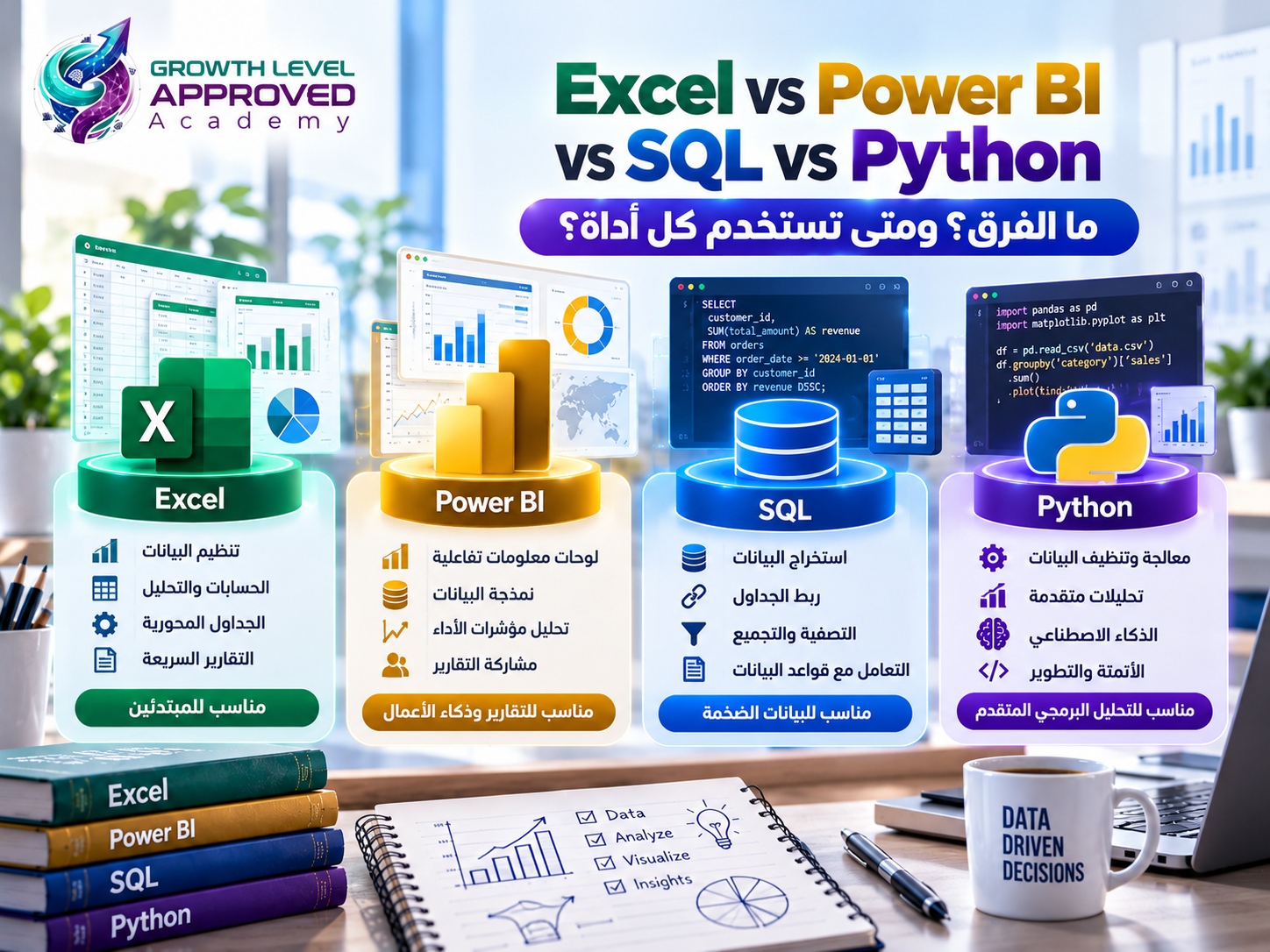
Is Python or Excel better for beginners?
Excel offers a lower barrier to entry for basic spreadsheet analysis. Python is especially useful for automation and code-based analytical workflows.
Can I learn data analysis online?
Yes. Online courses, official documentation, practice datasets, and guided projects can support a structured learning process.
Do I need strong English skills?
You can start learning with resources in your preferred language. However, understanding English technical terminology and documentation is beneficial.
How long does it take to become a data analyst?
There is no universal timeline. Foundational learning may take several months, while professional readiness depends on prior knowledge, practical experience, and employer expectations.
When should I start building projects?
Begin with small projects early in your learning journey. You do not need to master every tool before analyzing your first dataset.
Does a training course guarantee employment?
No training course can guarantee a job for every learner. Practical skills, portfolio quality, interview performance, and market conditions influence employment opportunities.
Conclusion
Learning data analysis becomes more manageable when you focus on a clear sequence of skills and consistent practice.
Start with data fundamentals and statistics, develop your Excel knowledge, then learn SQL and Power BI. Add Python when it supports your goals and complete projects that demonstrate genuine problem-solving ability.
At Growth Level Approved Academy, we emphasize live training and practical projects to help learners develop applied skills.
Explore our Excel and Power BI data analysis training program to understand the topics covered and determine whether it matches your learning goals.
References
Microsoft Excel: https://support.microsoft.com/excel
Microsoft Power Query: https://learn.microsoft.com/power-query/
Microsoft Power BI: https://learn.microsoft.com/power-bi/
Microsoft DAX: https://learn.microsoft.com/dax/dax-overview
PostgreSQL SQL Documentation: https://www.postgresql.org/docs/current/sql.html
Python Tutorial: https://docs.python.org/3/tutorial/
pandas Documentation: https://pandas.pydata.org/docs/
scikit-learn User Guide: https://scikit-learn.org/stable/user_guide.html
Comments (0)
No comments yet. Be the first!